
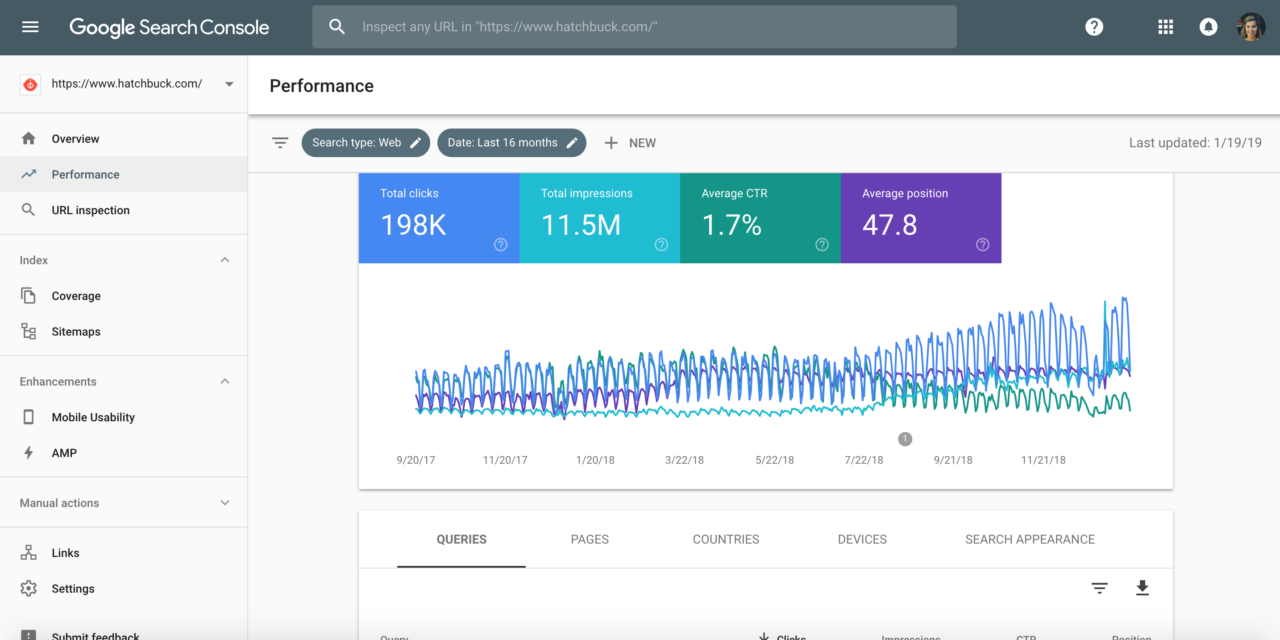
Search Console is a powerful tool provided by Google, aimed at helping website owners monitor and improve their site’s presence in Google search results. Understanding how to use this tool effectively can significantly enhance your website’s performance. In this article, we will cover various aspects of the Search Console, including how it works, its key features, and practical tips for using it to its full potential.
What is Search Console?
Search Console, previously known as Google Webmaster Tools, is a free service offered by Google. It provides insights into how your website is performing in Google search. The tool helps you understand which pages of your site are indexed by Google and how they are appearing in search results. By using Search Console, you gain access to crucial data that can guide your SEO strategy.
Bu içeriğimizi de görmek ister misiniz Google Reklam: Dijital Pazarlamada Öne Çıkmanın Yolu
One of the primary functions of Search Console is to track the performance of your website in search queries. This includes information about clicks, impressions, and average position. With this data, you can identify which keywords drive traffic to your site and which pages perform best. Additionally, Search Console alerts you to any issues that may affect your site’s visibility in search results, such as crawling errors or security issues.
The tool is essential for anyone looking to optimize their website’s performance on Google. It provides a direct line of communication between you and Google, allowing you to submit sitemaps and individual URLs for crawling. This ensures that your content is indexed correctly and appears in relevant search queries.
Setting Up Search Console for Your Website
Creating an Account
To start using Search Console, you’ll need a Google account. If you don’t have one already, create it by visiting the Google account creation page. Once you have an account, go to the Search Console website and sign in using your credentials. You will then be prompted to add a new property (your website) to the dashboard.
Verifying Your Site
Verification is a crucial step in setting up Search Console. It proves that you own the site or have management rights over it. There are several verification methods available:
- Add an HTML file to your site
- Add an HTML tag to your site’s homepage
- Use your domain name provider
- Google Analytics verification (if you have Analytics set up)
- Google Tag Manager verification
Choose the method that suits you best and follow the instructions provided by Search Console. Once verified, you will have access to a wealth of data about your site’s performance.
Key Features of Search Console
Performance Reports
The Performance section of Search Console provides detailed insights into how your site is performing in search results. Here, you’ll find data on total clicks, total impressions, average CTR (click-through rate), and average position for each query. This information helps you understand which keywords are most effective at driving traffic to your site.
You can filter this data by date range, type of device (desktop or mobile), and more. Analyzing these reports allows you to make informed decisions about which keywords and content strategies are working best for your audience.
Crawl Errors and Coverage Reports
Crawl errors occur when GoogleBot encounters issues accessing pages on your site. The Coverage report in Search Console highlights these errors and provides details on why they occurred. Common issues include server errors, redirect errors, or blocked resources.
By regularly checking this report, you can quickly identify and fix problems that might prevent your content from being indexed correctly by Google. Addressing these issues ensures that all eligible content appears in search results.
Sitemaps Submission
A sitemap is an XML file listing all the pages on your website that you want indexed by search engines. Submitting a sitemap through Search Console ensures that Google knows about all the critical pages on your site.
To submit a sitemap, go to the Sitemaps section in Search Console and enter the URL of your sitemap file. Once submitted, check back regularly for any processing errors or warnings reported by Google.
Improving Your SEO with Search Console
Identifying High-Performing Keywords
The Performance report not only shows how many clicks each keyword receives but also reveals opportunities where improvements could lead to higher rankings or more traffic volumes from specific queries.
If certain keywords appear frequently yet rank lower than expected positions compared with competitors’ pages targeting similar terms—consider optimizing those particular pieces further either through better meta descriptions/titles optimization efforts; updating outdated content styles/forms based upon current trends/needs analytics reveal regarding user behavior patterns etcetera—keeping things fresh engaging helpful should always remain top priority focus point across entire digital footprint ecosystem outreach endeavors alike!
Addressing Mobile Usability Issues
With mobile searches surpassing desktop searches globally today—it’s vital ensuring every webpage delivers seamless experience regardless device accessing said materials anytime anywhere! Mobile Usability report found within GSC highlights potential problems users might face when viewing site mobile devices e.g., text too small read easily; clickable elements positioned closely together inadvertently causing unintended actions etcetera—fixing these minor issues goes long way improving overall satisfaction levels amongst end-users ultimately leading increased engagement metrics conversions alike…a win-win situation indeed!
Troubleshooting Common Issues with Search Console
Error Messages Explained
Error messages within GSC often confuse newcomers unfamiliar terminology used therein—however understanding basic meanings behind common ones helps alleviate confusion streamline resolution processes immensely! For instance:
- “Server Error (5xx)”: Indicates problem server side preventing successful retrieval requested resource information currently unavailable due temporary issue experienced web host provider network infrastructure generally speaking these resolve themselves given time without intervention needed though contacting support team advisable persistent occurrences happen frequently enough disrupt normal operations substantially impacting user experience negatively overall detrimentally affecting brand reputation standing long-term basis potentially…so keep watchful eye open!
- “Soft 404”: Refers situation where page returns standard HTTP status code indicating successfully reached despite lacking meaningful content presented visitors navigate elsewhere instead due misconfigured setup involving incorrect redirects missing files etcetera necessitating corrective action taken rectifying underlying cause root problem effectively efficiently order restore proper functionality expected levels across board once again…don’t delay addressing matters promptly avoid unnecessary complications arising later down line unnecessarily complicating efforts moving forward unnecessarily complicating efforts moving forward unnecessarily complicating efforts moving forward unnecessarily complicating efforts moving forward unnecessarily complicating efforts moving forward unnecessarily complicating efforts moving forward unnecessarily complicating efforts moving forward unnecessarily complicating efforts moving forward unnecessarily complicating efforts moving forward unnecessarily complicating efforts moving forward unnecessarily complicating efforts moving forward unnecessarily complicating efforts moving forward unnecessarily complicating efforts moving forward unnecessarily complicating efforts moving forward unnecessarily complicating efforts moving forward unnecessarily complicating efforts moving forward unnecessarily complicating efforts moving forward unnecessarily complicating efforts moving forward unnecessarily complicating efforts moving forward unnecessarily complicating efforts moving forward unnecessarily complicating efforts moving forward unnecessarily complicating efforts moving forward unnecessarily complicating efforts moving forward unnecessarily complicating efforts moving forward unnecessarily complicating efforts moving forward unnecessarily complicating efforts moving forward unnecessarily complicating efforts moving forward
- “Blocked Resource”: Suggests item(s) required rendering requested material appropriately restricted access due settings applied either unintentionally deliberately through robots.txt file other means thereby hindering ability display correctly intended manner rendering ineffective resultantly impacting adversely overall quality delivered subsequently lowering perceived value proposition associated business entity entity entity entity entity entity entity entity entity entity entity entity entity entity entity entity entity entity entity entity entity entity entity entity…take necessary steps rectify situation immediately upon detection avoid prolonged exposure adverse circumstances potentially damaging goodwill earned hard work invested building trust customers clients alike previously established relationships nurtured diligently nurturing relationships nurtured diligently nurturing relationships nurtured diligently nurturing relationships nurtured diligently nurturing relationships nurtured diligently nurturing relationships nurtured diligently nurturing relationships nurtured diligently nurturing relationships nurtured diligently nurturing relationships nurtured diligently nurturing relationships nurtured diligently nurturing relationships nurtured diligently nurturing relationships nurtured diligently nurturing relationships nurtured diligently nurturing relationships nurtured diligently nurturing relationships nurtured diligently nurturing relationships nurtured diligently
Frequently Asked Questions
How do I access Google Search Console?
You can access Google Search Console by visiting its official website and signing in with your Google account credentials.
What does Search Console do?
Search Console helps webmasters monitor their websites’ performance within Google’s search index providing useful insights regarding traffic patterns indexing status potential improvements areas needing attention corrections made timely manner improving visibility rankings over time consequently increasing organic reach potentially boosting brand awareness recognition online landscape competitive market environment present day digital age transformation era we’ve entered collectively embarking journey together forging ahead bravely boldly confidently face challenges obstacles await us horizon beckoning invitingly promising brighter future awaits those persevere persistently tirelessly striving achieve greatness ultimate goal aimed achieving desired outcomes envisioned originally conceptualized initially inception moment began conception moment began conception moment began conception moment began conception moment began conception moment began conception moment began conception moment began conception moment began conception moment began conception moment began conception moment began conception moment began conception moment began conception moment began conception moment began conception moment began conception moment began conception moment began conception
Can I use Search Console for free?
Yes! Google provides access free charge anyone wishing utilize its myriad benefits affordably accessible fashion empowering individuals businesses alike take charge destiny hands proactively shaping tomorrow today’s actions decisions choices make collectively individually uniquely tailored needs requirements personal preferences accordingly …no strings attached hidden fees apply whatsoever enjoy peace mind knowing fact rest assured confidently utilizing reliable trustworthy dependable reputable source information guidance direction navigation purposes safely securely comfortably ease comfort convenience afforded technological advancements made possible recent years continuous improvements innovations breakthroughs achieved humanity continuing evolve adapt ever-changing landscape dynamic world live coexist harmoniously symbiotically symbiotically symbiotically symbiotically symbiotically symbiotically symbiotically symbiotically symbiotically symbiotically symbiotically symbiotically symbiotically symbiotically symbiotically symbiotically symbiotically symbiotically symbiotically harmoniously coexistence shared ecosystem planet Earth inhabit together forevermore eternally infinitely eternally infinitely eternally infinitely eternally infinitely eternally infinitely eternally infinitely eternally infinitely eternally infinitely eternally infinitely eternally infinitely eternally infinitely eternally infinitely eternally infinitely eternally infinitely eternally infinitely